
You're the CEO Now: How to Run an AI Dev Team in Claude Code
Picture this. You open your terminal, type a few sentences, and suddenly your screen splits into multiple panes - each one an autonomous AI developer working on a different piece of your project. They talk to each other. They pick up tasks. They challenge each other's ideas. And you just sit back and watch it unfold like a real-time strategy game.
This is Agent Teams in Claude Code. And it just became real.
What Are Agent Teams?
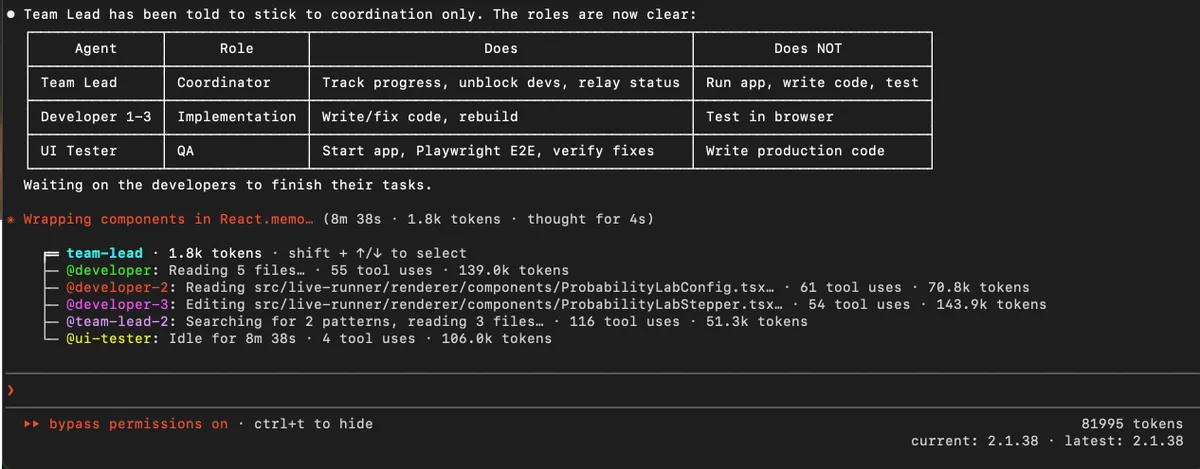
Agent Teams let you coordinate multiple Claude Code instances working together. One session acts as the team lead - it coordinates work, assigns tasks, and synthesizes results. The rest are teammates - independent sessions, each running in its own context window, communicating directly with each other.
Here is what makes this different from subagents: subagents run inside a single session and can only report back to the main agent. They cannot talk to each other. Agent Teams are fully independent Claude Code instances that message each other directly. Use subagents when you need quick, focused workers that report back. Use Agent Teams when teammates need to share findings, challenge each other, and coordinate on their own.
You stay in control the whole time. Claude never creates a team without your approval - either you request one, or Claude suggests one and waits for your confirmation before proceeding.
Enable It in 30 Seconds
Agent Teams are experimental and disabled by default. Flip the switch with one of these two methods:
Option 1: Environment variable
export CLAUDE_CODE_EXPERIMENTAL_AGENT_TEAMS=1
Option 2: Settings file
Add it to your settings.json:
{
  "env": {
    "CLAUDE_CODE_EXPERIMENTAL_AGENT_TEAMS": "1"
  }
}
That is it. You are now a team manager.
Spawn Your First Team
No config files. No YAML. Just describe the task and the team structure you want in natural language. Claude creates the team, spawns teammates, and coordinates work based on your prompt.
This example works well because the three roles are independent and can explore the problem without waiting on each other:
I'm designing a CLI tool that helps developers track TODO comments
across their codebase. Create an agent team to explore this from
different angles: one teammate on UX, one on technical architecture,
one playing devil's advocate.
Hit enter and watch it happen. Claude creates a team with a shared task list, spawns a teammate for each angle, lets them explore, synthesizes their findings, and cleans up when the work is done.
The lead's terminal lists all teammates and what they are working on. It feels like watching a project dashboard update itself in real time.
Two Ways to Watch the Action
You get to choose how your team appears on screen:
In-process mode is the default. All teammates run inside your main terminal. Use Shift+Up/Down to select a teammate and type to send them a message directly. This works in any terminal - no extra setup needed.
Split-pane mode is the showstopper. Each teammate gets its own visible pane. You literally watch multiple AI developers coding side by side in real time. It requires tmux or iTerm2 and does not work in VS Code's integrated terminal, Windows Terminal, or Ghostty.
If you want that real-time strategy game feeling - split-pane mode is the one. Watching three agents simultaneously investigate your codebase from different angles in separate panes is genuinely thrilling.
Control Your Team Like a Pro
Once a team is running, you talk to the lead in natural language. It handles coordination, task assignment, and delegation based on your instructions.
But here is the power move - Delegate Mode. Press Shift+Tab to cycle through permission modes. When an agent team is active, the cycle includes Delegate Mode, which restricts the lead to coordination-only tools. No coding, just spawning, messaging, and task management. This solves the common problem of the lead trying to implement tasks itself instead of delegating to teammates.
You can also bypass the lead entirely. Use Shift+Up/Down to select any teammate and message them directly. You are not locked into a chain of command - you can jump in wherever you want, just like a real team manager walking over to someone's desk.
The Shared Task List
Behind the scenes, the team runs on a shared task list. Tasks have three states: pending, in progress, and completed. Tasks can have dependencies - when a teammate completes a task that other tasks depend on, the blocked tasks automatically unblock.
Teammates claim tasks autonomously. When one finishes their work, they pick up the next unassigned, unblocked task from the list. No micromanagement needed.
All team configuration and tasks are stored locally at ~/.claude/teams/{team-name}/config.json.
Where Agent Teams Dominate
Agent Teams are most effective for tasks where parallel exploration adds real value. Here are the strongest use cases straight from the playbook:
Research and Review
Multiple teammates investigate different aspects of a problem simultaneously, then share and challenge each other's findings. A single reviewer gravitates toward one type of issue at a time. Split the criteria into independent domains and everything gets thorough attention at once:
Create an agent team to review PR #142. Spawn three reviewers:
- One focused on security implications
- One checking performance impact
- One validating test coverage
Have them each review and report findings.
Three agents, three angles, all running at the same time. It feels like commanding a strike team.
New Modules or Features
Teammates each own a separate piece without stepping on each other. When the boundaries are clear, this is where Agent Teams hit their stride:
Create an agent team to build the new dashboard feature.
One teammate on the API layer, one on the frontend components,
one on the test suite.
When the API teammate finishes type definitions, it messages the frontend teammate directly. The test teammate asks the API teammate to spin up a dev server. They self-coordinate without you lifting a finger.
Debugging with Competing Hypotheses
Instead of testing theories one at a time, spawn teammates that each chase a different hypothesis in parallel. They converge on the answer faster - and they can challenge each other's findings along the way.
Think of it like a debate between experts where you are the judge.
Cross-Layer Coordination
Changes that span frontend, backend, and tests - each owned by a different teammate. This is the classic "too many moving parts for one brain" scenario, and Agent Teams handle it beautifully.
When NOT to Use Agent Teams
Not every task needs a team. Agent Teams add coordination overhead and use significantly more tokens than a single session. They work best when teammates can operate independently.
Skip teams and use a single session or subagents for:
- Sequential tasks where each step depends on the previous one
- Same-file edits where multiple agents would create conflicts
- Work with many dependencies that prevent parallel execution
- Routine tasks that one agent handles perfectly fine
You would not assemble a five-person team to rename a variable. Same logic applies here.
Token Costs: The Price of Power
This is the most important section. Agent Teams use significantly more tokens than a single session. Each teammate has its own context window, and token usage scales with the number of active teammates.
For research, review, and new feature work, the extra tokens are usually worthwhile. For routine tasks, a single session is far more cost-effective.
Think of it like hiring contractors - you bring them in for the big jobs, not for everyday tasks.
Your CLAUDE.md Still Works
Good news - CLAUDE.md works normally with Agent Teams. Teammates read CLAUDE.md files from their working directory, so any project-specific guidance you have set up applies to the whole team automatically. No extra configuration needed.
Known Limitations
Agent Teams are experimental and the docs are upfront about it. Current known limitations include issues around session resumption, task coordination, and shutdown behavior. You can only run one team per session, nested teams are not supported, and split-pane mode is limited to tmux and iTerm2.
The lead sometimes tries to implement tasks itself instead of delegating. Two fixes: explicitly tell it "wait for your teammates to complete their tasks before proceeding" in your prompt, or use Delegate Mode (Shift+Tab) to restrict it to coordination-only tools.
These are early days - but the core experience already feels like something fundamentally new.
Related Approaches
Agent Teams sit alongside other parallel work strategies in Claude Code:
Subagents are your lightweight delegation option. They spawn helper agents for research or verification within your session - better for tasks that do not need inter-agent coordination.
Manual parallel sessions using git worktrees let you run multiple Claude Code sessions yourself without automated team coordination.
The progression is clear: subagents for quick solo tasks, Agent Teams when workers need to actually collaborate.
Getting Started: Your First Mission
Here is the recommended progression:
Week one: Enable Agent Teams and start with a code review. Three reviewers, three angles - security, performance, test coverage. Low risk, high reward. Watch how they coordinate and get a feel for the flow.
Week two: Try a research exploration. Give the team an open-ended design question with three different perspectives. Watch them challenge each other's ideas.
Week three: Go for a feature implementation with clear boundaries. One teammate per layer, each with their own territory.
By then you will have a gut feel for when teams add value and when a solo session is the better call.
The Bottom Line
Agent Teams transform Claude Code from a single developer into a coordinated squad you manage in real time. You describe what you want, assign roles, watch multiple AI agents spin up in separate panes, pick up tasks, message each other, and deliver results in parallel.
It is experimental. It burns tokens. It has rough edges. And it is the most exciting thing to happen in AI-assisted coding this year.
Enable it. Spawn a team. Watch your terminal come alive.
You are not just writing code anymore. You are running the show.