

Claude Code is powerful out of the box, but without structure, it jumps straight into coding: no planning, no tests, no systematic approach. The Superpowers plugin fixes this issue by enforcing proven development workflows that prevent the chaos.
What Superpowers actually does
Superpowers is a skills framework that intercepts Claude Code at key moments. Instead of immediately writing code when you ask for something, it stops and asks questions first. Then it enforces TDD, creates implementation plans, and reviews its own work before moving on.
The core workflow:
- Brainstorm: refines your idea through Socratic questioning
- Plan: creates bite-sized tasks (2-5 minutes each) with exact file paths
- Execute: dispatches subagents per task with two-stage review
- Finish: verifies tests, offers PR/merge options, cleans up
Installation (10 Seconds)
# Open the plugin menu
/plugin

# Navigate to "Discover" tab
# Search for "superpowers"
# Select and install
After installation, restart Claude Code. You'll see "SessionStart:startup hook succeeded: Success" confirming the plugin is active.
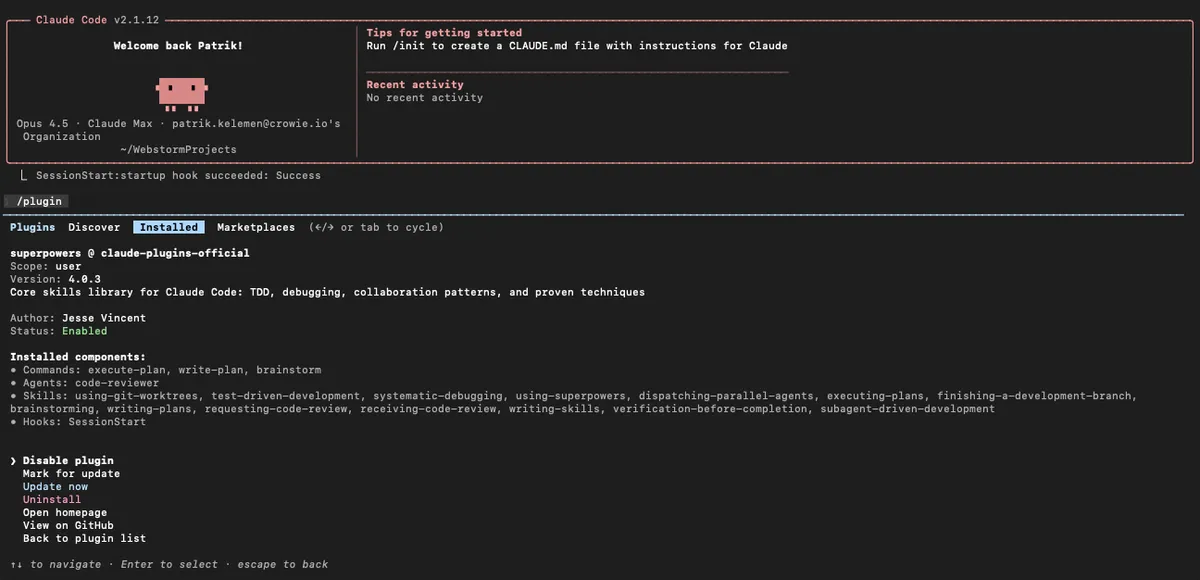
What gets installed
The plugin bundles everything you need:
| Component | Included |
|---|---|
| Commands | execute-plan, write-plan, brainstorm |
| Agents | code-reviewer |
| Skills | 14 skills including TDD, debugging, git worktrees, code review |
| Hooks | SessionStart (auto-bootstraps the workflow) |
The three core commands
/superpowers:brainstorm
Use this before ANY new feature. Claude will:
- ask clarifying questions about your goal
- explore alternatives you haven't considered
- present the design in digestible chunks for validation
- save a design document for reference
When to trigger: Start of any feature, refactor, or migration.
/superpowers:write-plan
After brainstorming, this creates an implementation plan where:
- each task takes 2-5 minutes maximum
- every task has exact file paths and complete code snippets
- verification steps are built into each task
- the plan assumes an "enthusiastic junior engineer with no context" will execute it
/superpowers:execute-plan
Runs the plan using subagent-driven development:
- fresh subagent spawned per task (clean context)
- two-stage review: spec compliance, then code quality
- human checkpoints between batches
- critical issues block progress automatically
The 14 skills explained
| Skill | What it does |
|---|---|
| test-driven-development | Enforces RED-GREEN-REFACTOR. Deletes code written before tests. |
| systematic-debugging | 4-phase root cause process with defense-in-depth |
| using-git-worktrees | Creates isolated branch, runs setup, verifies clean baseline |
| using-superpowers | Introduction to the skills system |
| dispatching-parallel-agents | Concurrent subagent workflows |
| executing-plans | Batch execution with checkpoints |
| finishing-a-development-branch | Merge/PR/keep/discard options, cleanup |
| brainstorming | Socratic design refinement |
| writing-plans | Detailed implementation planning |
| requesting-code-review | Pre-review checklist, blocks on critical issues |
| receiving-code-review | Responding to feedback systematically |
| writing-skills | Meta-skill for creating new skills |
| verification-before-completion | Ensures fixes actually work |
| subagent-driven-development | Two-stage review per task |
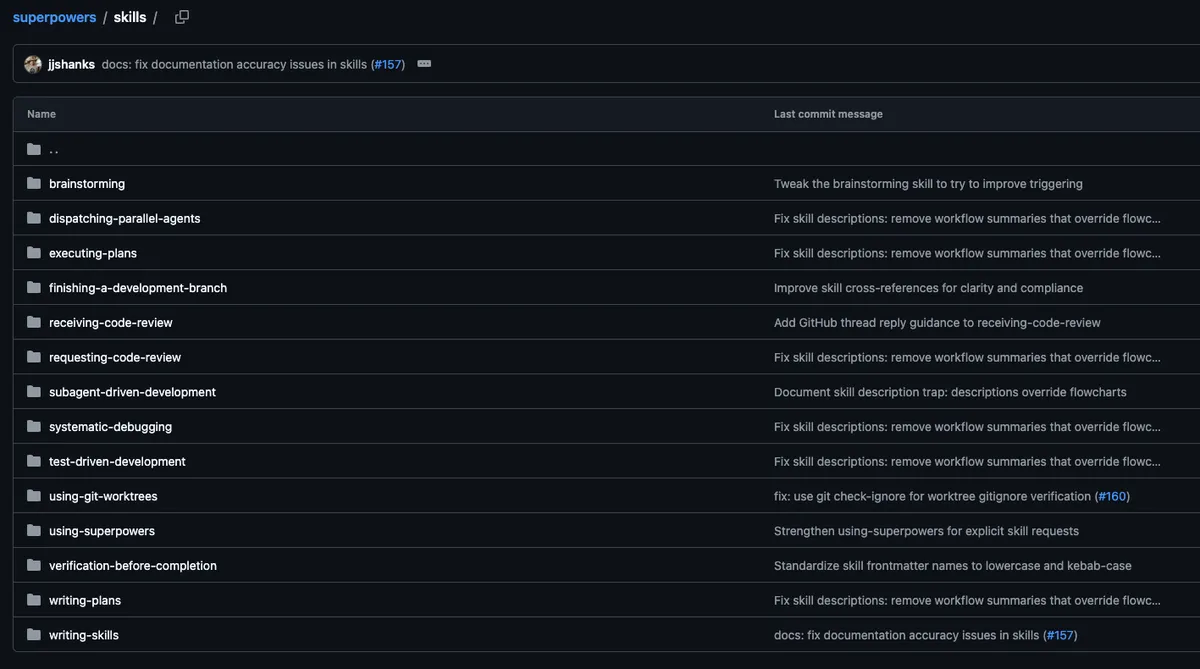
How skills trigger automatically
Skills aren't commands you call - they activate based on context:
- start discussing a new feature → brainstorming activates
- design approved → using-git-worktrees activates
- implementation begins → test-driven-development activates
- task completed → requesting-code-review activates
- all tasks done → finishing-a-development-branch activates
Claude checks for relevant skills before any task. These are mandatory workflows, not suggestions.
Git worktree integration
Superpowers uses git worktrees for isolated development:
# What happens behind the scenes:
git worktree add ../project-feature feature-branch
cd ../project-feature
# Claude works here, main branch stays clean
Benefits:
- run multiple Claude instances on different features
- keep main branch stable during experimentation
- easy cleanup if things go wrong
Subagent-driven development
The most powerful pattern. Instead of one long Claude session:
- Main agent creates the plan
- Fresh subagent executes each task
- Review agent (code-reviewer) checks the work
- Main agent continues or requests fixes
Why this works: each subagent starts with clean context focused on ONE task. No accumulated confusion from long sessions.
TDD enforcement
Superpowers takes TDD seriously. The skill:
- requires failing test BEFORE implementation
- watches the test fail (proves it tests something)
- implements minimal code to pass
- commits at green
- refactors only after green
If Claude writes code before tests, the skill instructs it to delete that code and start over.
Practical example
You: I need user authentication for my Express app

Claude (with Superpowers):
→ Activates brainstorming skill
→ Asks: OAuth or passwords? Session or JWT? What providers?
→ Explores: Rate limiting? Account lockout? Password requirements?
→ Presents design in sections for your approval

You: Looks good, let's plan it

Claude:
→ Activates writing-plans skill
→ Creates 12 tasks, each 2-5 minutes
→ Task 1: Create failing test for /signup endpoint
→ Task 2: Implement signup handler to pass test
→ Each task has exact file paths and code

You: Execute

Claude:
→ Spawns subagent for Task 1
→ code-reviewer agent validates output
→ Spawns subagent for Task 2
→ Reports progress, asks for approval to continue
Managing the plugin
From the /plugin menu you can:
- Disable plugin: temporarily turn off
- Mark for update: flag for next update cycle
- Update now: get latest version immediately
- Uninstall: remove completely
- View on GitHub: see source code
When NOT to use Superpowers
- quick one-off questions
- simple file edits
- tasks under 5 minutes
For these, the overhead isn't worth it. Superpowers shines on multi-file features, refactors, and migrations requiring systematic execution.
Quick Reference
| Action | How |
|---|---|
| Install | /plugin → Discover → superpowers |
| Start design | /superpowers:brainstorm |
| Create plan | /superpowers:write-plan |
| Execute plan | /superpowers:execute-plan |
| Update | /plugin → select superpowers → Update now |
Superpowers transforms Claude Code from "helpful assistant that sometimes goes off the rails" into "systematic development partner that follows proven processes." The structured workflow prevents the most common failure modes: skipped tests, missing edge cases, and features that drift from requirements.