For every one visitor who contacts you with a question, dozens leave without saying a word. They had doubts. They had questions. They hit a wall somewhere on your site, closed the tab, and moved on to a competitor.
You'll never see them in your analytics. You'll never know they were there. But they were buying customers you just lost.
In this guide, you'll learn:
- Why your website analytics are missing the real story
- The 5 questions every visitor has (and how to answer them instantly)
- Why traditional support tools fail small businesses
- How an AI chatbot for small business recovers lost leads
- What to look for when choosing a website chatbot
The Real Problem: Analytics Show Symptoms, Not Causes
Google Analytics, Hotjar, and Microsoft Clarity tell you what happened. They don't tell you why.
What analytics tell you:
- 70% of visitors leave your pricing page without signing up
- Average session duration is 1 minute 42 seconds
- Your checkout page has a 65% exit rate
What analytics don't tell you:
- Half of those pricing page visitors left because they couldn't tell if your tool integrates with Shopify
- A third bounced because they couldn't find your refund policy
- The rest didn't understand how you're different from competitors
Analytics show symptoms. They never show causes. Without knowing the cause, you can't fix anything.
The 5 Questions Every Visitor Has
Visitors don't want to read your FAQ. They don't want to fill out a contact form. They want fast answers to specific questions like:
- "Does this work with my existing tools?"
- "Can I cancel anytime?"
- "Do you offer a refund if I don't like it?"
- "What's the difference between your plans?"
- "Do you support my language or region?"
You probably have the answers somewhere on your site. But if finding them takes more than 10 seconds, visitors leave.
This is where most small businesses lose the majority of potential customers, not because the information is missing, but because it's not accessible in the exact moment the visitor needs it.
Why Traditional Support Solutions Fail Small Businesses
You've probably tried the usual options. Here's why they don't work.
Live Chat Requires a Team You Don't Have
Live chat sounds great: someone always available to answer questions. In reality, it requires staffing. You or your team have to actively monitor incoming messages, ready to respond within seconds.
For a small business owner juggling sales, operations, and product work, this isn't realistic. A widget saying "We usually reply in 2-3 hours" is worse than no chat at all.
FAQ Pages Don't Get Read
Be honest, when did you last read a company's FAQ top to bottom? Visitors scan for keywords, don't find what they need in 3 seconds, and leave. FAQ pages make you feel like you answered the question. They don't actually help visitors.
Contact Forms Filter Out Casual Buyers
Contact forms only capture the most motivated visitors. You lose all the casual lookers who might have converted with one quick answer, and those are the majority of your potential customers.
Enterprise Tools Are Overkill
Intercom and Zendesk are built for companies with dedicated support teams. The features are overwhelming, the pricing punishes growth, and 90% of the capabilities are wasted on a small business.
Small businesses need something different: a tool that works automatically, without requiring a team to run it.
How an AI Chatbot for Small Business Actually Solves This
Most articles about AI chatbots focus on "ticket deflection." For small businesses, that misses the point. You don't have a flood of tickets. You have a silent drain of visitors you never hear from.
The real value of an AI chatbot for small business is twofold:
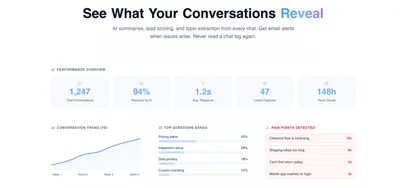
- Giving you a window into what visitors are actually asking
- Capturing leads before they leave
Here's how it works in 5 steps.
Step 1: Answer Questions Instantly, in Any Language
When a visitor has a question, they get a real answer within seconds, 24/7. A good AI chatbot trained on your website content handles the majority of common questions automatically, no effort required from you.
Step 2: Capture Insights You Can't Get Anywhere Else
When a visitor types "do you offer a discount for nonprofits", that's gold. Even if the answer is no, you now know nonprofits are considering you.
When someone asks "can I import data from Trello", you've learned that Trello users are potential customers.
These insights don't come from analytics. They come from conversations.
Step 3: Get Alerted When Something Breaks
Modern AI chatbots monitor conversations in real time. You get an email when:
- Five visitors ask about a feature that doesn't exist yet
- Your checkout page breaks
- The AI couldn't answer a common question
You catch problems while they're still fixable, not weeks later when the damage is done.
Step 4: Capture Leads Without Being Pushy
The best chatbots use non-invasive lead capture. They don't demand emails upfront. Instead, they collect contact details naturally during conversations that show buying intent.
Visitors are far more willing to share info after they've already gotten value from the conversation.
Step 5: Escalate to You When It Matters
When the AI hits a question it can't answer, or a visitor explicitly asks for a human, the conversation gets forwarded to you via email. You respond when you can, no live chat timer pressure.
The Recovered Lead Nobody Talks About
Here's what makes AI chat for small business different from every other support tool: it turns lost visitors into recovered leads.
Every visitor who engages with your chatbot is telling you two things:
- They're interested enough to ask
- Something is holding them back
This is the perfect moment to capture their contact information, naturally, as part of the conversation.
Even if they leave without buying, you now have:
- Their name and email
- The question they asked
- Context on what they were looking for
You can follow up the next day with a personalized answer. You can send a targeted offer. You can simply check in. That's a recovered lead that would have otherwise been gone forever.
For a small business, this is the difference between losing 10 customers this week and converting 4 of them next week.
What to Look for in an AI Chatbot for Your Website
Not all AI chatbots are built for small business. Here's what actually matters:
| Feature | Why It Matters |
|---|---|
| Fast setup | Should take under a minute. If it takes longer, you won't maintain it. |
| Multilingual support | Your visitors come from different regions. English-only loses revenue. |
| Email handoff | No live chat team needed. AI escalates to email when required. |
| Non-invasive lead capture | Don't demand emails upfront. Collect naturally during conversations. |
| Real-time alerts | Know immediately when visitors hit problems. |
| Flat-rate pricing | Avoid per-seat or per-conversation models. Predictable costs scale with growth. |
| Data privacy | Your customer conversations stay secure and protected. |
Start Listening to Your Website Visitors Today
Your website is your hardest-working salesperson, open 24/7, serving visitors worldwide, never taking a day off.
But right now, it can't talk to visitors. It can't answer their questions, address their doubts, or capture them before they leave.
An AI chatbot for small business changes that. No support team needed. No big budget. No weeks of setup.
Try Namiru Free
Namiru offers exactly what small businesses need:
- Paste your URL and get a trained chatbot in 30 seconds
- Answers visitor questions in any language
- Non-invasive lead capture built in
- Real-time alerts when something breaks
- Flat-rate pricing, no per-seat fees
- Fully hosted on EU infrastructure
- Free tier with 50 conversations per month
No credit card. No setup calls. No hidden fees.
Your visitors are trying to tell you something. It's time to start listening.